


Last updated on: August 2nd, 2026
Movie School Free » Film Directing Course » Film Cinematography for Directors » Basic camera technique & movements in film
Whether you are producing, directing, or editing, mastering film terminology is essential for communicating your vision and translating ideas into a professional shooting script. This guide breaks down the essential digital video terminology and camera movements every filmmaker must know.
Aspect ratio defines the proportional relationship between the width and height of an image (e.g., Width:Height). Common aspect ratios include:
Pro-Tip: Always shoot within your camera’s “Safe Zone” to ensure boom mics or off-set equipment don’t appear when your film is cropped for a different medium.
Frame Rate, measured in Frames Per Second (FPS), indicates how many individual images are captured or displayed per second. Standard cinematic film is shot at 24 fps, which provides the classic “movie look.” Television in North America typically uses 30 fps (or 60 fps for smooth HD), while European broadcasts use 25 fps. Altering the frame rate can create slow-motion (shooting at high FPS) or fast-forward effects.
Image resolution refers to the number of pixels (individual dots of light) that make up a frame, defined by width × height. Higher resolutions produce clearer, more detailed images but result in larger file sizes. Common resolutions include Full HD (1920×1080) and 4K (3840×2160).
Exposure determines how bright or dark your shot is, controlled by the amount of light hitting the camera sensor. If too much light enters, the image is overexposed (blown out); if too little enters, it is underexposed (too dark). Filmmakers control exposure primarily through the camera’s aperture (iris) and shutter speed.
Camera movement is a critical tool for building emotion and atmosphere. A poorly executed movement can distract the audience, so movements should only be used when they serve the story.
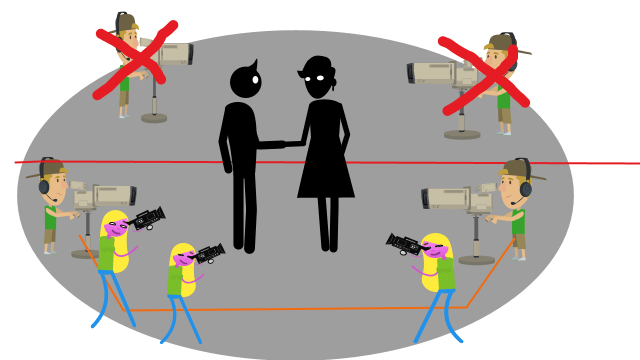
The 180-degree rule is an essential spatial guideline. It establishes an imaginary straight line (axis) between two characters interacting in a scene. The camera must remain on one side of this 180-degree arc to maintain consistent screen direction.
Crossing this line will make it appear as though the characters have swapped positions and are no longer looking at each other.
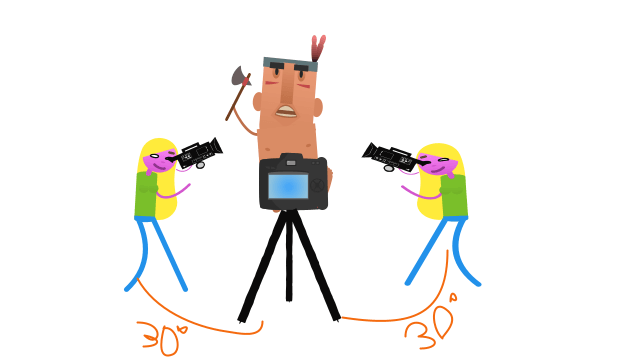
The 30-degree rule is an editing guideline that states you must move your camera angle by at least 30 degrees between successive shots of the same subject. Failing to do so results in a jarring Jump Cut, which visually disrupts the scene.
A Point of View (POV) shot replicates the exact visual perspective of a character, allowing the audience to see exactly what the character sees. To avoid breaking the “magic of cinema,” characters rarely look directly into the lens during standard dialogue, usually looking 30 degrees to the side, unless intentionally simulating direct eye contact.
A Pan involves keeping the camera base stationary on a tripod while turning the lens horizontally to the left or right, similar to shaking your head “no.” A Swish Pan (or Whip Pan) is an extremely fast pan that creates a blurred transition between subjects.
These movements often are done relatively slowly unless doing what is called: “Swish Pan,” which is a high-speed pan that creates a blurred background. This camera movement also excellent to immolate point of view
A Tilt keeps the camera base stationary while pointing the lens vertically up or down, similar to nodding your head “yes.” Tilting up from a low angle can make a character appear powerful or dominant, while tilting down from a high angle can make them appear vulnerable.
A Zoom changes the focal length of the lens to magnify (Zoom In) or widen (Zoom Out) the subject without physically moving the camera. Zooming in is often used to highlight a specific detail or amplify a character’s internal emotion.
A Dolly involves physically moving the entire camera forward (Dolly In) or backward (Dolly Out) on a track or wheeled cart. Unlike a zoom, a dolly shot changes the physical perspective and depth of the environment, making the movement feel much more immersive. A Tracking Shot (or Track Left/Right) moves the camera horizontally parallel to the subject’s motion.
Camera movement is a powerful tool for dictating a scene’s emotional tone, but it must be used with clear intent. A wrong or purposeless movement can instantly ruin the atmosphere and break the audience’s immersion.
Keep it Motivated and Invisible: A common trap for beginner directors is overusing dynamic shots. Every movement must be fluid and substantial to the story. If a movement is jarring, it reminds the viewer they are watching a movie—and once that illusion is broken, you lose your audience. Remember: the best camera work is invisible. It serves the narrative without calling attention to itself.
The “Safety Take” Rule: If you decide to execute a complex camera movement, always shoot a static “safety take” of the exact same action. A dynamic shot might look brilliant in your head or on the monitor, but if it doesn’t fit the rhythm in the editing room, having a static backup will save your scene.
To master these techniques, start actively analyzing camera angles and movements in professional films and television shows. Go beyond just identifying the movement—try to understand the specific emotion the director intended to evoke.
Your Next Shoot: Film a short scene utilizing the various camera movements introduced in this guide. Immediately afterward, reshoot the exact same scene using only static camera angles. Compare the two versions in the editing room to see how drastically the camera’s motion (or lack thereof) alters the emotional weight of the scene.